
Getting your business listed on ChatGPT can help potential customers discover your products and services when searching on the platform. With OpenAI’s Business Hub, you can now claim an existing business listing or create a new profile.
Launched in beta on November 10, 2026, Business Hub introduces a new way for businesses to manage how they appear on ChatGPT. However, the submission process involves a few steps, including business verification, domain ownership checks, and approval.
For B2B SaaS companies, this creates another opportunity to strengthen brand discoverability across AI-powered search. Whether you’re selling CRM software, HR management tools, cybersecurity solutions, or marketing automation platforms, having an accurate business profile can help establish your brand’s presence in ChatGPT’s discovery ecosystem. It’s particularly relevant as more buyers use AI tools to research software, compare vendors, and shortlist potential solutions.
Can You List Your Business in ChatGPT?
Before getting started, it’s important to know whether your business is eligible for a ChatGPT listing.
Unlike Google Business Profile, ChatGPT Business Hub accepts online-only businesses, including brands and agencies without a physical storefront/ website. Local businesses can also claim existing listings, subject to regional and operational eligibility requirements.
This is particularly relevant for SaaS companies that operate entirely online. You don’t need a physical office or storefront to establish a business presence. For example, a SaaS company offering project management software, an AI-powered CRM, or an enterprise HR platform can create a profile using its official website and business details.
The platform is not limited to U.S. businesses. Eligible businesses in other countries where ChatGPT is available can also apply.
Note: Getting listed on ChatGPT Business Hub doesn’t guarantee better rankings or more recommendations. It gives you control over your business details, product feeds, and available analytics, while ChatGPT independently decides which businesses to surface.
What to Prepare Before You Start
Once you’ve confirmed your business is eligible, gather the following details before opening ChatGPT Business Hub. Having them ready will make the verification and submission process smoother.
- Government-issued ID: For personal identity verification.
- Business website: Your official website and domain.
- DNS access: Permission to add a TXT record to your domain.
- Business name: Your public-facing name and legal registered name.
- DBA or trading name: If your business operates under a different name.
- Business type: Your legal structure, such as a sole proprietorship or registered entity.
- Business address: Your physical and registered addresses, if different. P.O. boxes are not accepted.
- Registration or tax ID: The identifier applicable to your business and country.
- Contact details: Your business email address and phone number, if requested.
For SaaS companies: Make sure your public-facing brand name matches the name used across your website, product pages, and other business profiles. If your product has a different name from your parent company, clarify the relationship between the two. This can help avoid inconsistencies when customers search for your brand or product.
How to Get Your Business Listed in ChatGPT: Step by Step
Here’s a step-by-step process for getting your business listed through ChatGPT Business Hub:
Step 1: Search for Your Business or Create a Profile
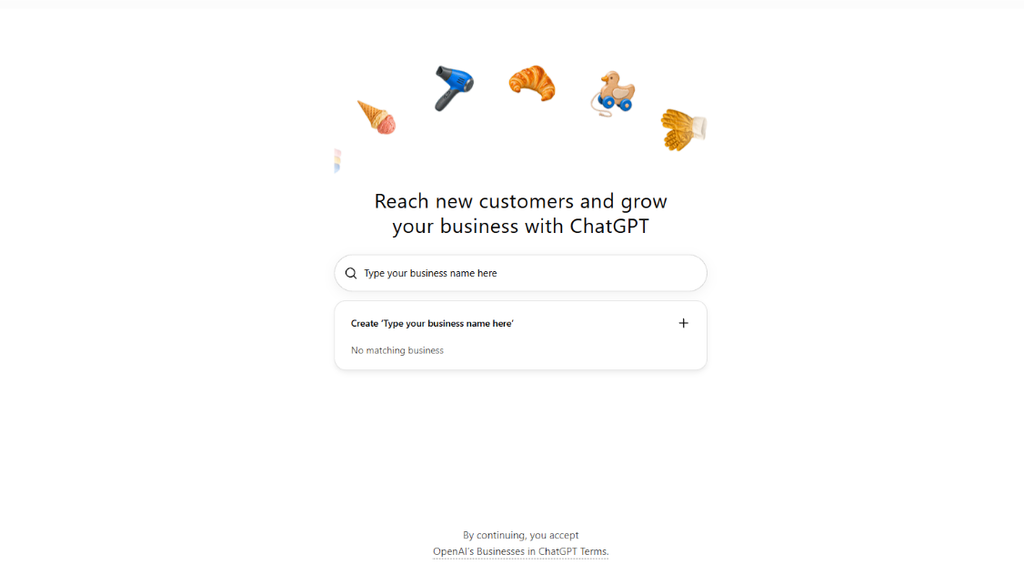
Sign in to ChatGPT Business Hub and search for your business name. If an existing listing appears, select it to start the claiming process (covered in the next section). Otherwise, choose Create a new profile to proceed.
Step 2: Choose Physical Location or Website
Select how customers interact with your business:
- Physical location: For businesses customers visit in person.
- Website: For online businesses that operate through a website.
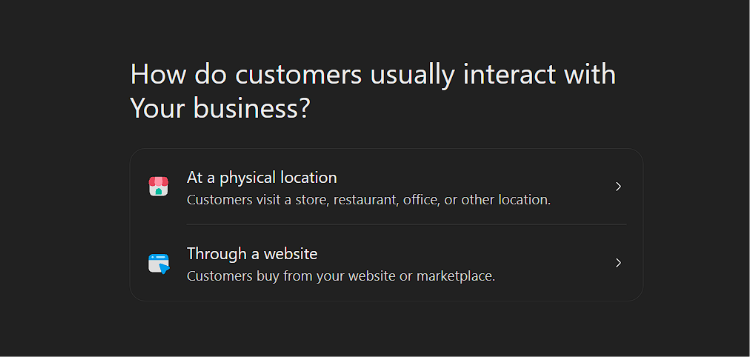
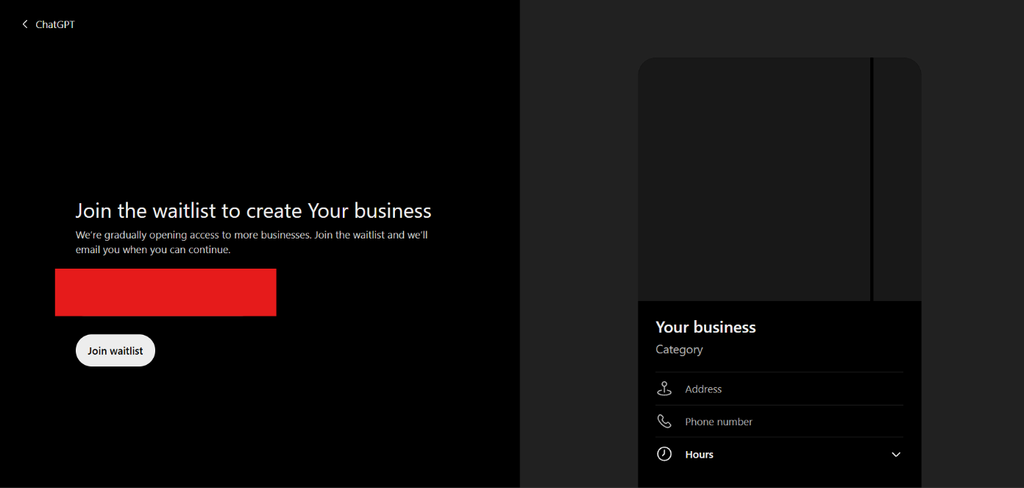
Your selection determines the next steps. Some physical-location businesses may encounter a waitlist depending on availability.
Step 3: Verify Your Domain With a DNS TXT Record
If you select the website option, ChatGPT will ask you to verify domain ownership using a DNS TXT record.
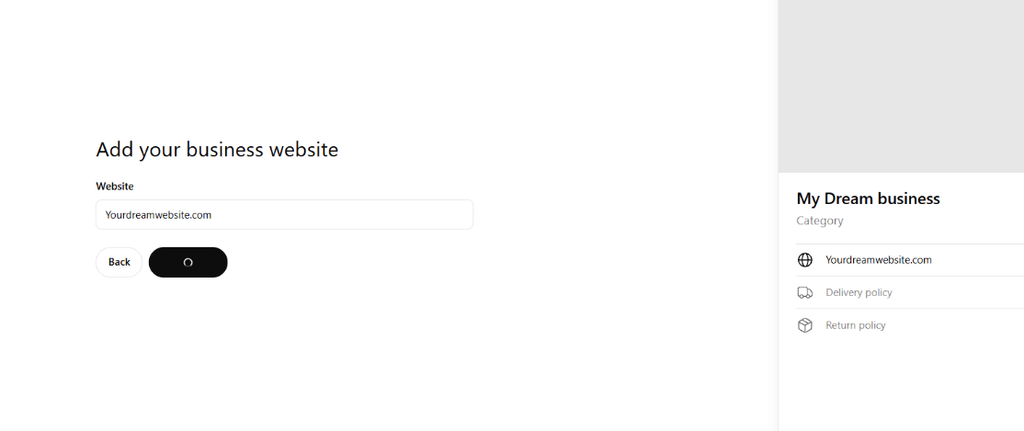
How to Add the TXT Record:
- Copy the TXT record type, name, and value provided by ChatGPT.
- Open your domain registrar or DNS hosting account.
- Add a new TXT record using the details provided.
- Save the changes and return to Business Hub to complete verification.
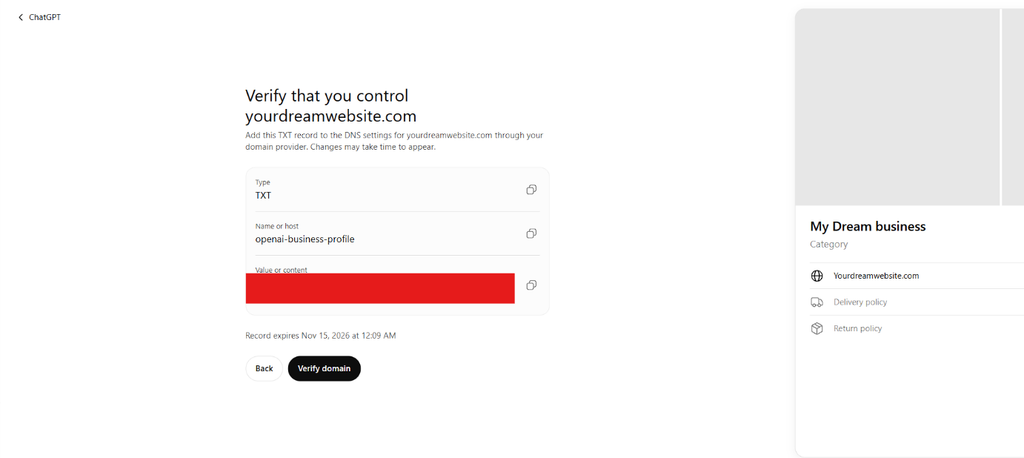
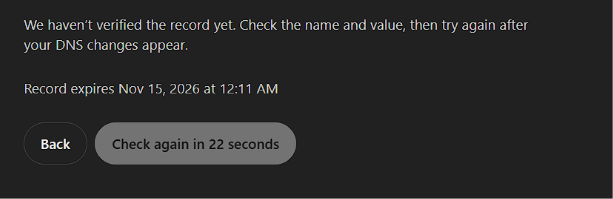
Note: DNS propagation can take anywhere from a few minutes to 48 hours, depending on your provider. If verification fails immediately, wait and try again.
Step 4: Pick a Category and Add a Description
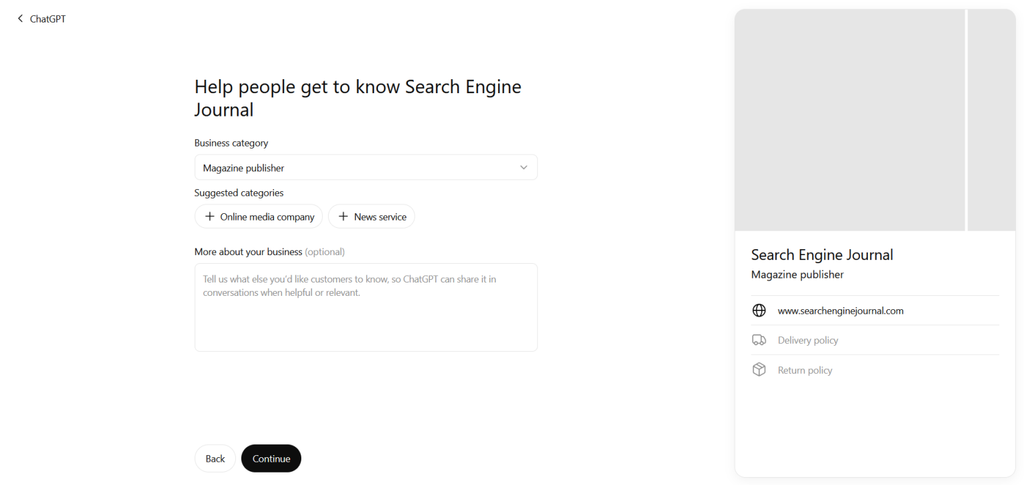
Choose the category that best describes your business from the available options. You can also add an optional description explaining what your business does, its products or services, and who it serves. Keep the description clear and specific so customers can understand your offering.
For B2B SaaS companies, avoid describing your business using generic terms like “technology solutions provider.” Instead, clearly communicate your software category, primary use cases, target customers, and key capabilities.
For example, rather than writing “We provide innovative business software,” a CRM company could describe itself as:
“Our platform is an AI-powered CRM for B2B sales teams, helping growing businesses manage leads, automate sales workflows, and improve pipeline visibility.”
This gives a much clearer picture of what the company offers and the audience it serves.
Step 5: Add Contact Details and Answer Delivery and Returns Questions
Add your business email address and phone number, if required. ChatGPT may also ask about your delivery and return policies. Select the options that accurately reflect your business.
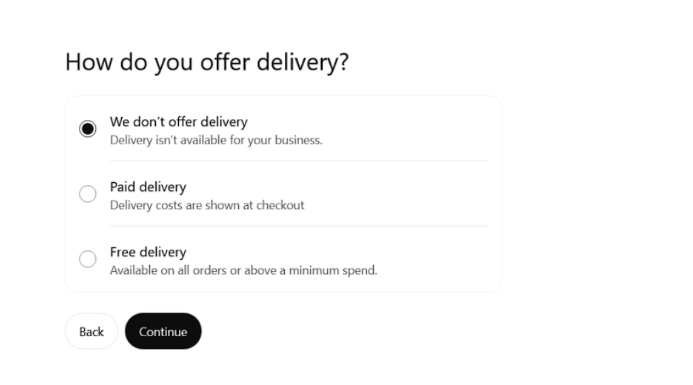
If you’re a service provider, publisher, or another business that doesn’t sell physical products, check whether options such as No delivery or Returns unavailable apply. Review the profile preview before proceeding to ensure these details don’t misrepresent your business.
Step 6: Review the Draft Profile
Once you’ve entered the details, ChatGPT saves your business profile as a draft. Review the business name, category, description, contact information, and policy details before moving to verification.
Step 7: Complete Identity and Business Verification
To finish up, complete identity verification and submit your company information. Provide the assets gathered earlier from the preparation list, such as your government ID, official registered and public names, registration identifiers, website domain, and physical addresses.
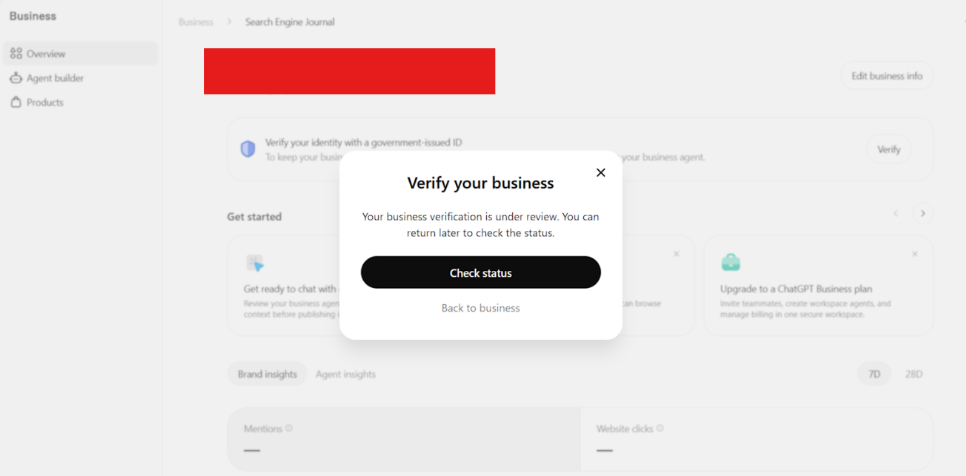
Step 8: Check Your Approval Status
After submission, return to your Business Hub overview to check the verification status. Your application may show as pending or under review before approval. Once approved, your business profile becomes available for management through Business Hub.
How to Claim an Existing Business Listing on ChatGPT
If your business already appears on ChatGPT, you can claim the existing profile instead of creating a new one. Here’s how:
Step 1: Find Your Business Listing
Sign in to ChatGPT Business Hub and search for your business name. Select the matching profile, check its website and address, and click Get started to begin the claiming process.
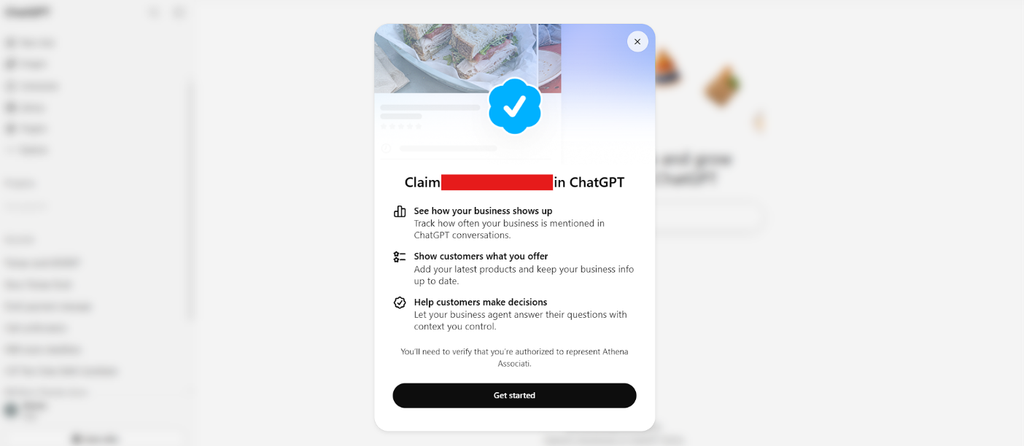
Step 2: Verify Business Ownership
Choose an available verification method:
- Phone: Receive a code via SMS or an automated call.
- Website: Verify your domain using a DNS TXT record.
- Email: Use your business domain email.
- Shopify: Connect your store and approve the requested permissions.
If the number is outdated or inaccessible, use another available method, such as domain, email, or Shopify verification. Update your contact details once you gain access.
Step 3: Complete Identity Verification
Verify your identity through Persona using a government-issued ID. You may also need to confirm that you’re authorized to represent the business.
How to Write a Business Description ChatGPT Can Use
Your business description should help ChatGPT understand what your business does, who it serves, and when its products or services are relevant to a customer’s needs. Be specific about your core offerings, target audience, industry, and service locations rather than relying on broad marketing statements.
A simple formula to follow is: [Business name] is a [business type] that offers [products or services] to [target audience] in [location or service area]. It specialises in [key offerings or areas of expertise].
Avoid keyword stuffing, exaggerated claims, and vague phrases like “industry-leading solutions.” Keep the description factual, clear, and focused on what customers can expect from your business.
Example: Business Description for a B2B SaaS Company
Consider a company offering HR management software to mid-market businesses.
Instead of using a broad description like “We help businesses manage their workforce,” it could write:
“[Company Name] is an HR management software provider that helps mid-market and enterprise businesses streamline employee onboarding, payroll administration, leave management, and workforce operations. Its platform is designed for HR teams looking to automate administrative processes and improve employee management.”
A good SaaS business description should communicate:
- Product category: What type of software do you offer?
- Target audience: Who is the product designed for? (Startups, SMBs, enterprises, specific industries.)
- Core use cases: What problems does the software solve?
- Key capabilities: What are the main features or functionalities?
- Differentiation: What makes the product distinct from other solutions in its category?
Common Problems When Listing Your Business and How to Fix Them
Here are some common issues you may encounter while listing or verifying your business on ChatGPT Business Hub, along with ways to resolve them:
- DNS Record Not Detected: Check that the TXT record’s name and value match the details provided by ChatGPT. Allow time for DNS propagation before retrying verification. If the issue persists, contact your domain provider.
- Waitlist on New Physical-Location Profiles: Some physical-location businesses may be placed on a waitlist. Check your registered email for updates from OpenAI and wait for access rather than creating duplicate profiles.
- Registration or Tax ID Confusion: The required registration or tax identifier depends on your country and business type. Refer to your official business documents and follow the requirements displayed in the verification form.
- P.O. Box Rejected: ChatGPT requires a physical address for business verification. Enter your actual business address instead of a P.O. Box, and provide your registered legal address separately if it differs.
- Profile Stuck Under Review: OpenAI doesn’t specify a fixed verification timeline. Early reports suggest reviews can take 15 minutes to over a day. Check your Business Hub dashboard and email for updates or requests for additional information. If delays persist, contact OpenAI support.
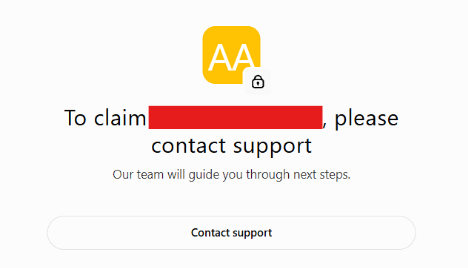
- Business Already Claimed: If someone else has claimed your listing, select Dispute ownership, if available, and complete the requested verification to establish that you’re the rightful owner or an authorised representative.
What to Do After Your Business Is Listed
Getting your business listed is only the first step. Once your profile is approved, you can monitor its performance, manage access, and keep your business information accurate across platforms. Here are four things to focus on:
How to Read Business Hub Insights
Business Hub provides insights into business mentions and website clicks. Track both metrics to understand how often ChatGPT references your website and how much traffic it sends your way. Compare these figures with your website analytics to identify changes in traffic and conversions.
For B2B SaaS companies, website clicks are only one part of the picture. Track whether ChatGPT-referred visitors explore high-intent pages such as product pages, pricing pages, integration directories, comparison pages, and demo request forms.
You can also monitor assisted conversions and branded search activity to understand whether AI discovery is contributing to the buyer journey, even when it doesn’t result in an immediate website visit.
How to Add Admins and Give an Agency Access
You don’t have to manage your profile alone. Use the Invite option in the Business Hub to add team members or grant agency access. Each admin should use their own ChatGPT account to manage the profile.
How to Keep Your Business Details Consistent
Keep your business name, address, phone number, website, and description accurate across your website, directories, and social profiles. Update outdated listings, especially after a rebrand, address change, or change in contact details.
Supporting Steps: Schema, About Page and Crawler Access
Your Business Hub listing is one part of your online presence. Also, maintain an updated About page, implement relevant Organization or LocalBusiness schema markup, and ensure OpenAI’s search crawler, OAI-SearchBot, can access the pages you want surfaced in ChatGPT search. These steps help make your business information easier to find and understand.
SaaS companies should also pay attention to how their software products are represented across their websites. Maintain dedicated product pages that clearly explain product functionality, use cases, integrations, pricing, and target audiences. Where relevant, use appropriate structured data to describe your organisation and software offerings.
Make sure important pages, including product documentation, integration pages, feature pages, and comparison content, are accessible to the relevant search crawlers.
Conclusion
Getting listed on ChatGPT Business Hub is a good first step, but it doesn’t guarantee that ChatGPT will mention or recommend your business. That takes more than a profile. You also need relevant content, strong technical SEO, website authority, and consistent business information across the web.
For B2B SaaS companies, this is particularly important because software discovery often involves multiple research touchpoints. Buyers may use ChatGPT to identify potential vendors, compare software categories, evaluate alternatives, and understand specific product capabilities. A Business Hub profile can help establish your brand’s presence, but building visibility across these discovery journeys requires a much broader search strategy.
That’s where Contensify can help. With 13+ years of experience in SEO, content strategy, and AI search optimisation, we help businesses build visibility across traditional and AI-powered search.